CI Observatory
GitHub Actions · DORA · AI in CI

See how your CI/CD really works.

One command reads the GitHub Actions history of your repositories, public or private, and writes one HTML report: what is slow, what fails and why, which tests run twice, how fast you ship, how much AI is involved, and what to fix first.

The report is ready in a minute or two. An owner covers all of its active public repositories in one report. Public repositories work without signing in; sign in with GitHub for private ones.

$ curl -LsSf https://kirbac1.github.io/ci-observatory/install.sh | sh
$ ci-observatory --org your-org --open

macOS and Linux. The installer adds uv if it is missing (it brings its own Python), then the ci-observatory command. No sudo. You also need the GitHub CLI, logged in with gh auth login.

Live demo · 19 of Aiven's public repositories · 5,620 runs
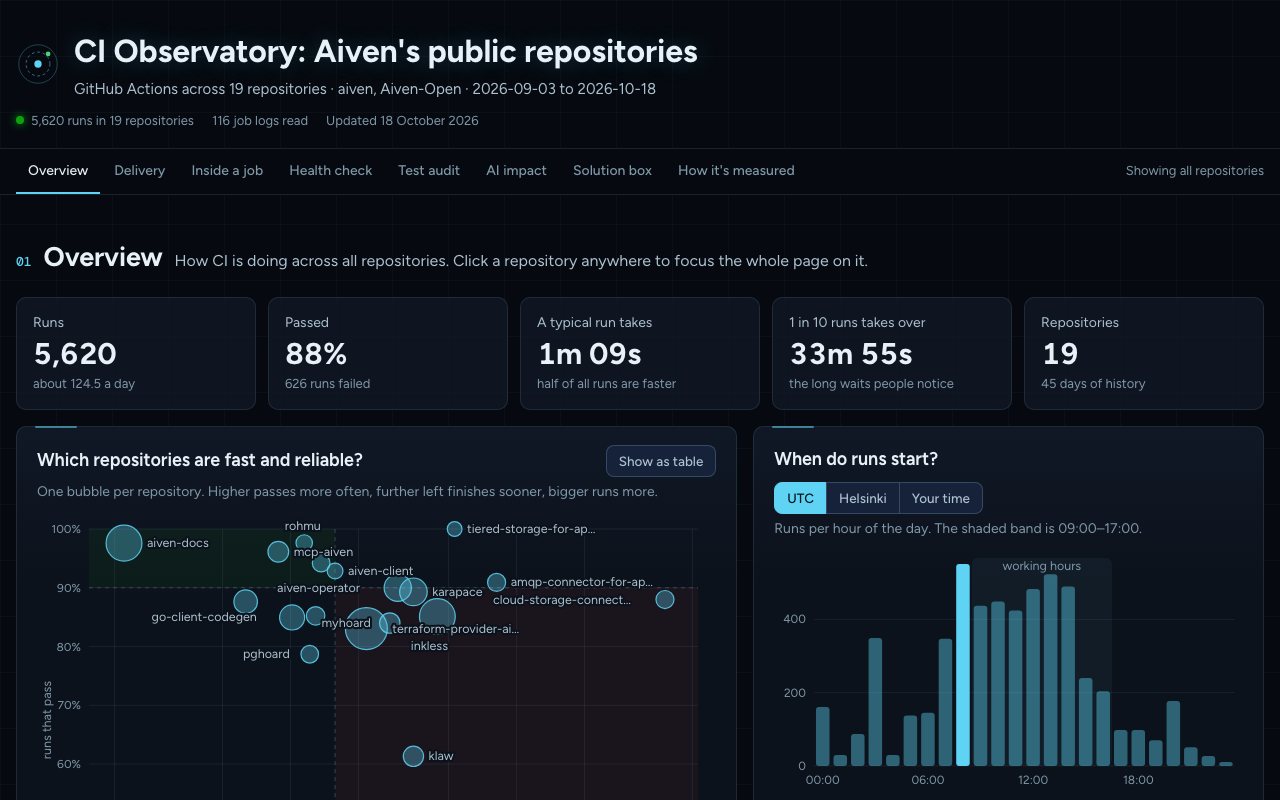
The report's overview: 5,620 runs across 19 repositories, 88% passed, a bubble chart of speed against reliability, and runs per hour of the day
What the report shows

Seven questions, one page.

Every chart answers one question in plain words. Click any repository to focus the whole page on it. The live demo is built from public data of 19 repositories in Aiven's public GitHub organisations.

01 · Overview

Which repositories are fast and reliable?

Runs, pass rate, typical and slow run times, then one bubble per repository: higher passes more often, further left finishes sooner.

  • When runs start, by hour, in UTC or your own time
  • How many runs pass each day, weekends shaded
Overview with headline numbers and the speed against reliability chart
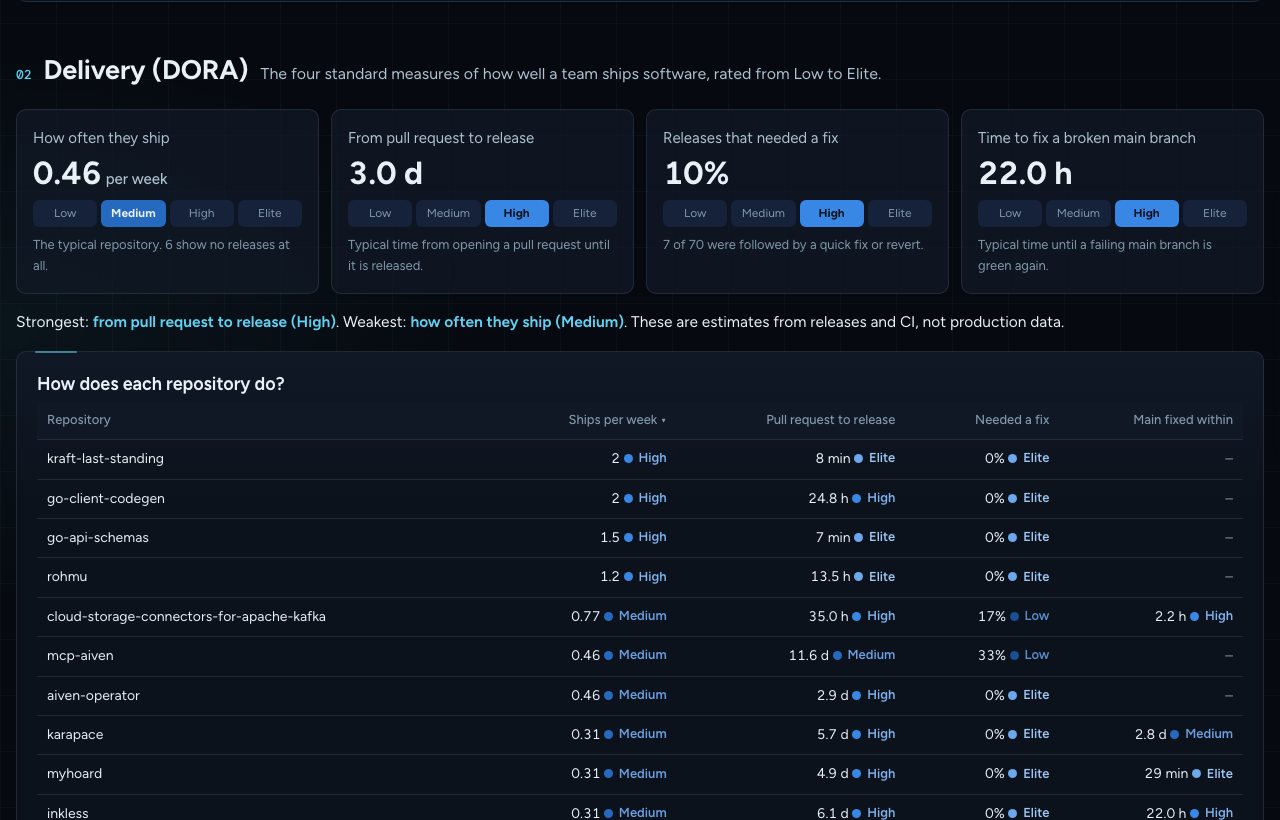
02 · Delivery (DORA)

How well do you ship?

The four DORA measures, each rated Low to Elite: how often you ship, pull request to release, releases that needed a fix, and time to fix a broken main branch.

  • Per repository, sortable
  • A timeline of every release
Four DORA tiles rated Low to Elite and a table of repositories
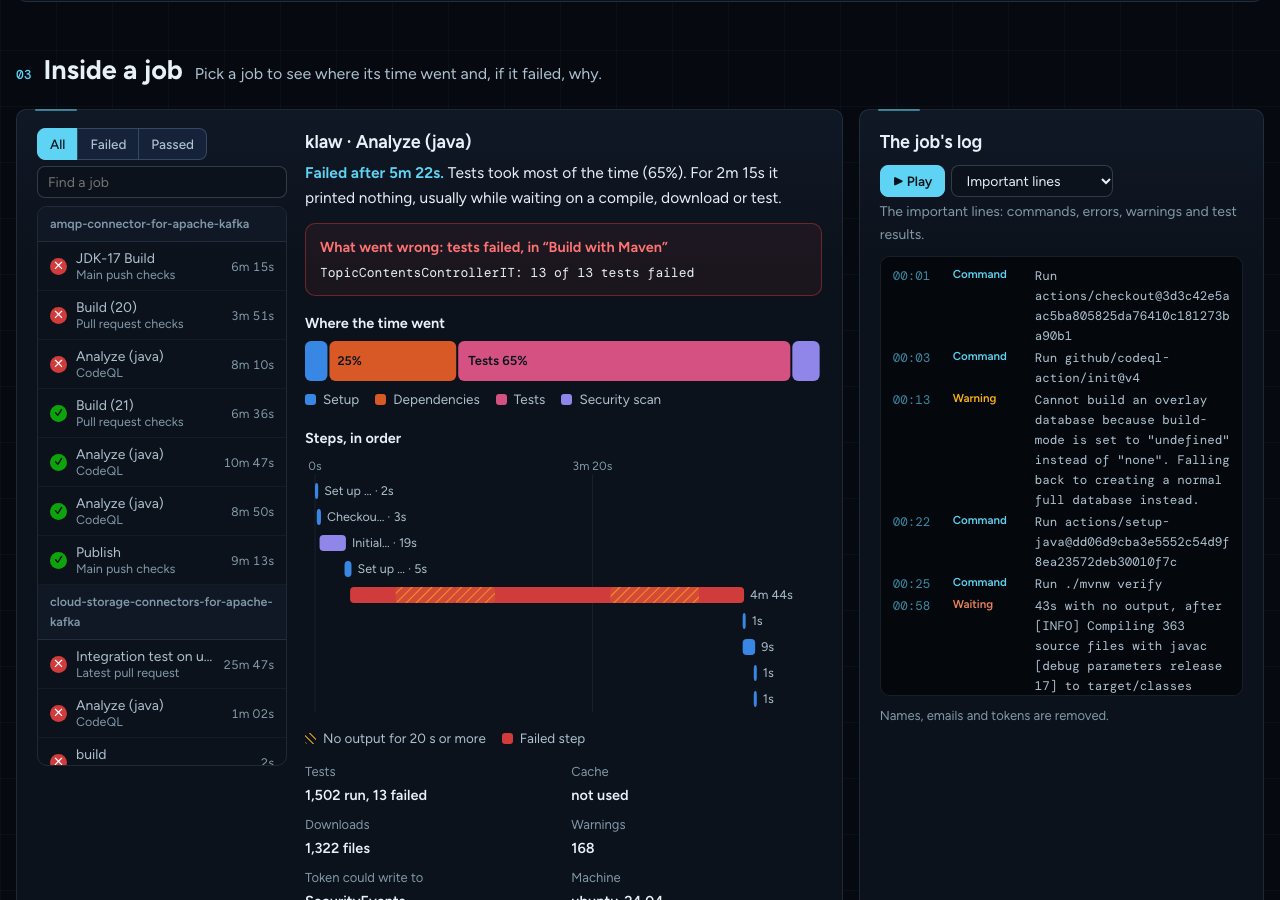
03 · Inside a job

Where did the time go, and why did it fail?

Pick any job: its time split into setup, dependencies, build, tests and scans, its steps in order with the silent stretches marked, and the log lines that matter.

  • "What went wrong" in one sentence
  • Replay the log at speed
A failed Maven job: tests took 65% of the time, 13 of 13 tests failed, steps in order and the important log lines
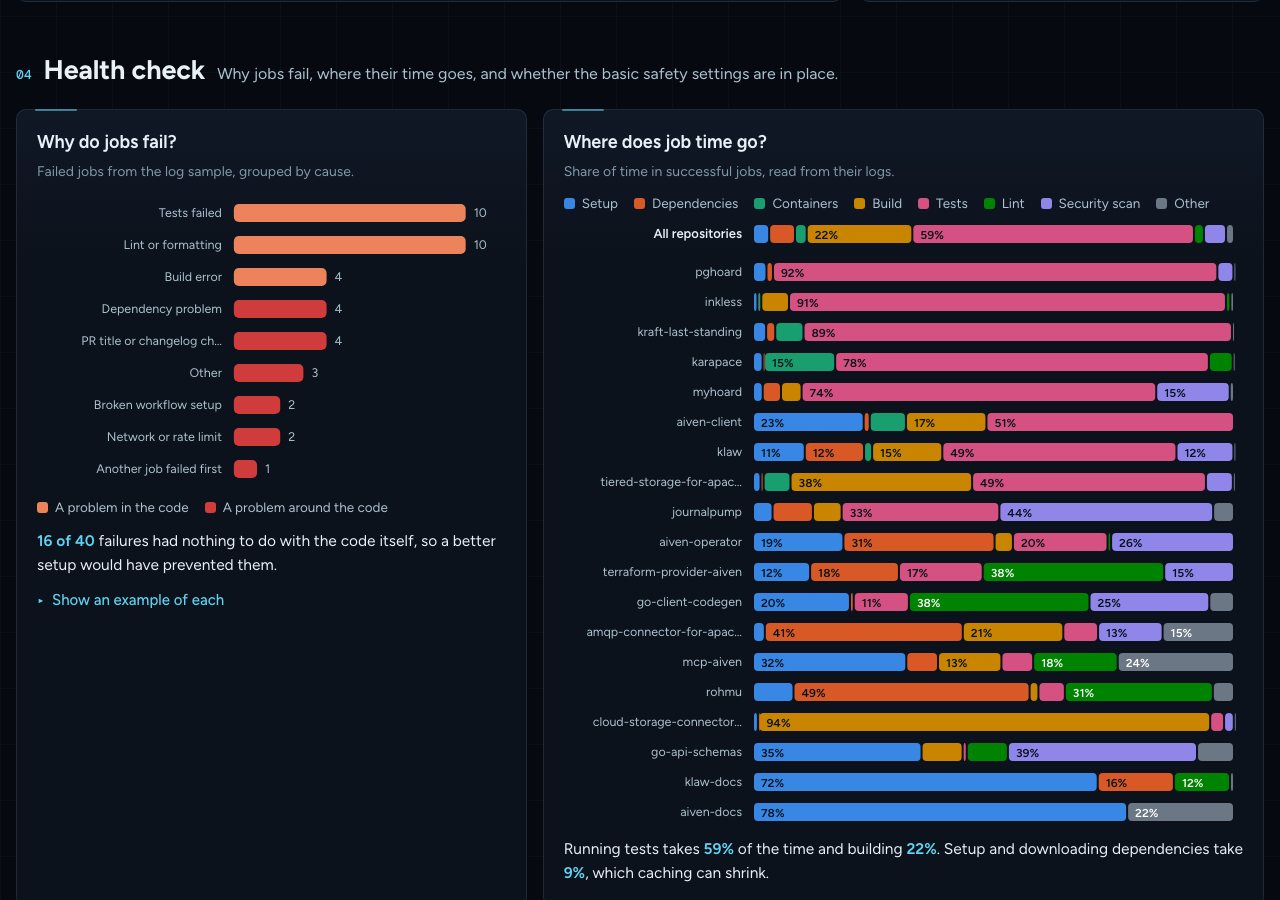
04 · Health check

Why do jobs fail, and are the basics in place?

Failures sorted by cause, code problems apart from timeouts, network errors and process checks. Then the safety basics per repository.

  • Read-only tokens, pinned actions, time limits
  • Outdated actions before they break
Failure causes as bars and a table of safety checks per repository
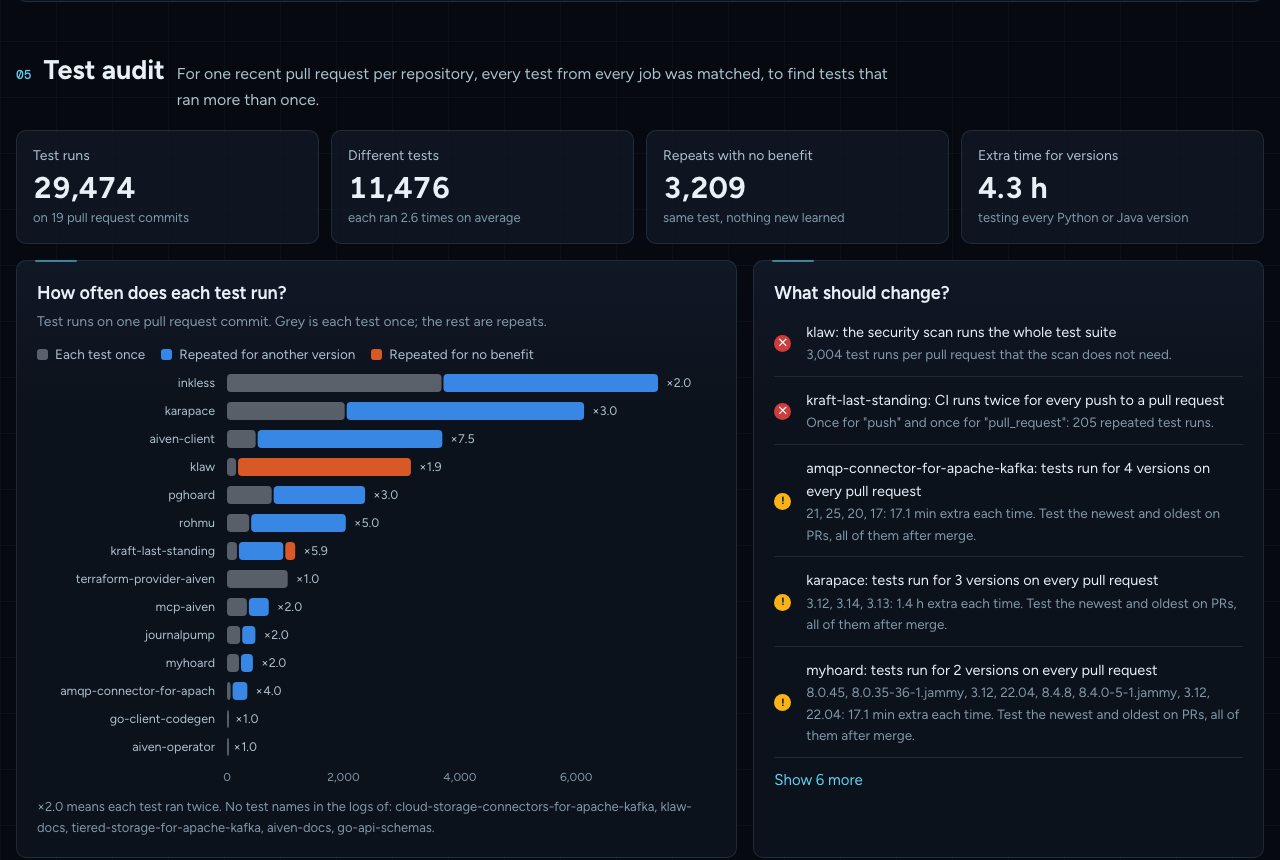
05 · Test audit

Which tests run more than once for nothing?

For one recent pull request per repository, every test from every job is matched. Repeats are sorted: another version (useful), or the same test again (waste).

  • Tests inside security scans, double triggers, overlapping workflows
  • Checked before any fix is suggested
Test runs per repository split into each test once, repeats for another version and repeats for no benefit
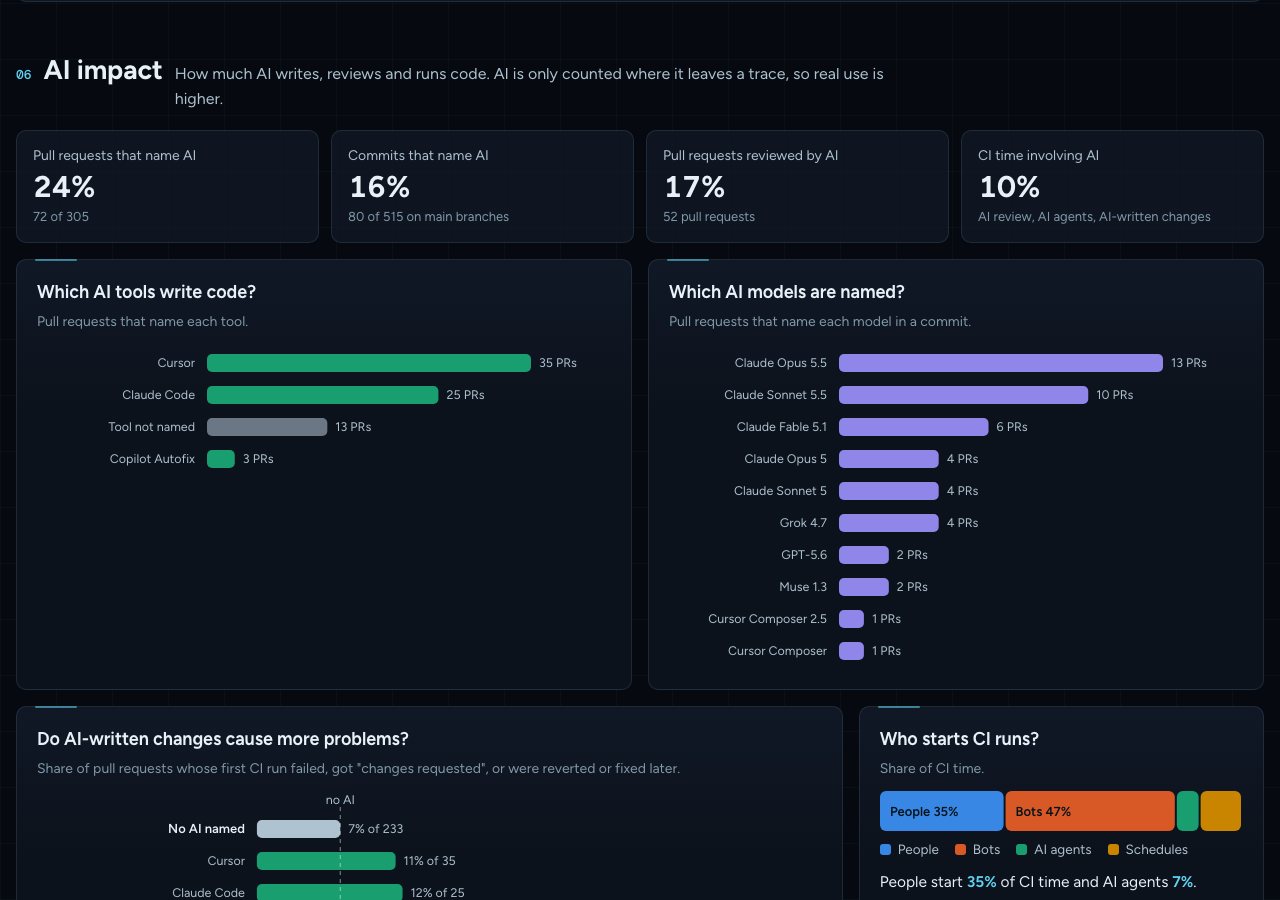
06 · AI impact

How much AI writes, reviews and runs code?

Which AI tools and models are named in pull requests and commits, how much CI time involves AI, and whether AI-written changes run into more problems, with honest error bars.

  • Claude Code, Copilot, Cursor, Codex, Gemini and more
  • Only counted where AI leaves a trace
Shares of pull requests and commits that name AI, AI tools and models by pull request count
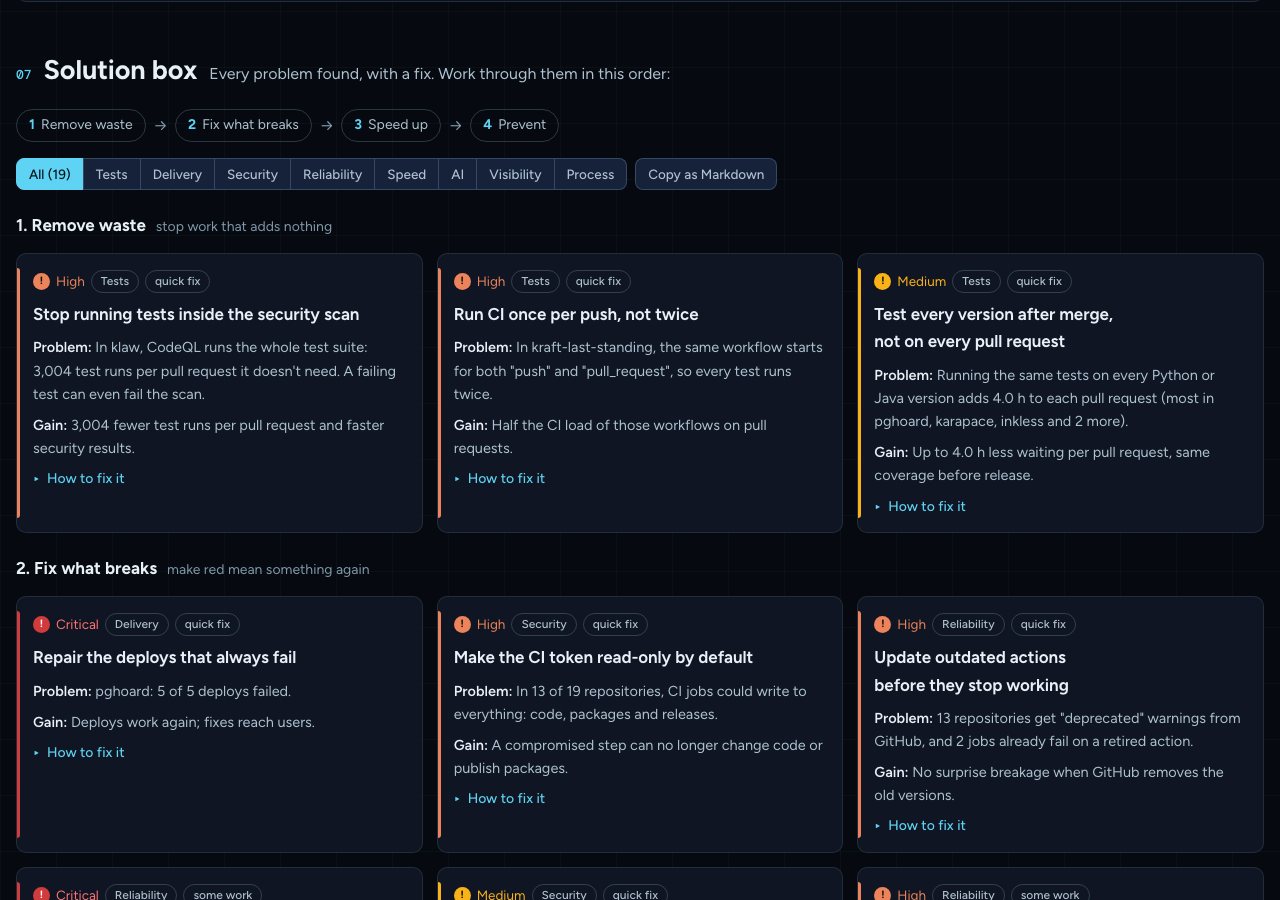
07 · Solution box

What should you fix first?

Every problem found becomes a card: the problem in your numbers, the gain, and how to fix it, often with ready YAML. Ordered: remove waste, fix what breaks, speed up, prevent.

  • Filter by area
  • Copy the whole list as Markdown for an issue
Solution cards with severity, problem, gain and a How to fix it link, grouped in phases
Private repositories

Private repositories work the same way.

The command does not change. What matters is that your GitHub login, or the token you hand to gh, can read them. Pick one:

Simplest

Your own gh login

Add the scopes once. If your organisation uses SAML SSO, authorise the GitHub CLI for it.

gh auth refresh -s repo,read:org
ci-observatory --org my-org \
  --visibility private
Least privilege

A fine-grained token

Read-only Actions, Contents and Pull requests, on just the repositories you choose.

GH_TOKEN=github_pat_… \
  ci-observatory --org my-org
Automated

Inside GitHub Actions

The workflow's own token covers its repository. A GitHub App token covers a whole organisation.

env:
  GH_TOKEN: ${{ github.token }}

Step by step, with SSO, token approval and GitHub Enterprise Server: the private repositories guide.

Safe by design

It only looks.

Read-onlyEvery request is a GET. Nothing is ever written to GitHub.
Your token stays putWith the GitHub CLI, the tool only runs gh and never sees a token. Without it, GH_TOKEN goes to the GitHub API and nowhere else.
Stays on your machineOne HTML file and its data, in a folder you choose. No server, no telemetry.
People are not namedAuthors count as "people". Log lines are cleaned of names, emails and tokens.
Everyday commands

Point it at a repository, a list, or a whole organisation.

You wantCommand
The repository you are inci-observatory --open
One or a few repositoriesci-observatory --repo my-org/api --repo my-org/web
The 12 busiest repositories of an organisationci-observatory --org my-org
The 25 busiest private onesci-observatory --org my-org --top 25 --visibility private
A fast first lookci-observatory --org my-org --quick
The last 60 daysci-observatory --org my-org --days 60

A dozen repositories take about 5 to 10 minutes and 1,000 to 2,000 API calls, well within GitHub's hourly limit. A second run reuses cached logs and is much faster.